Follow or cancel an online payment
How co-signers pay online with Pay Now, how the posting updates on its own, and when to cancel a payment in progress.
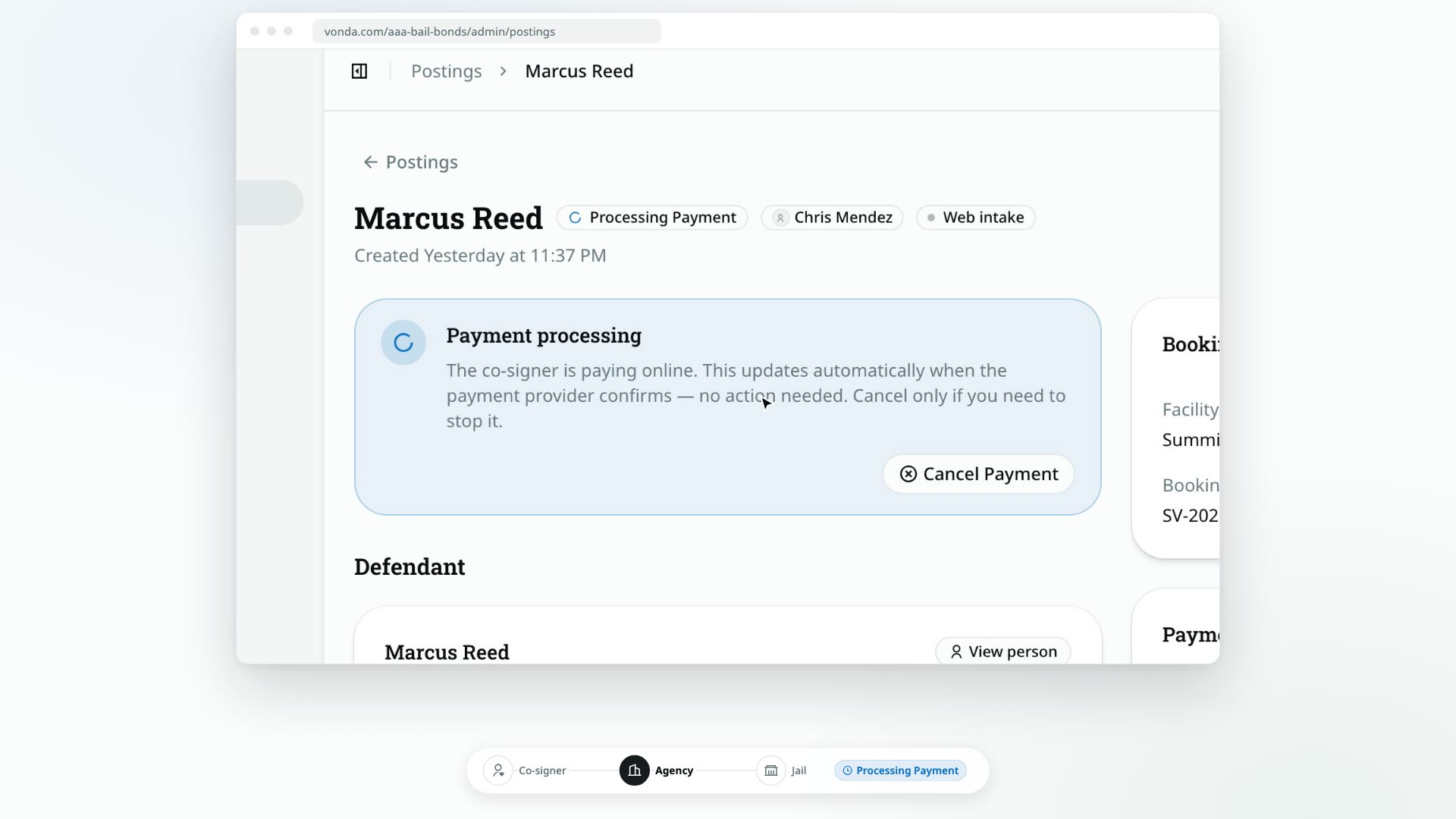
If your agency has connected Kurv in Settings → Payments, co-signers pay the amount due by card from their bail page. You don't confirm these payments. The posting updates by itself when Kurv reports the result. The only thing you might need to do is cancel a payment that's stuck.
Before you start
- Online payments are on. An admin has connected Kurv in Settings → Payments, and it isn't disabled. See Connect Kurv for online payments.
- To cancel, you can edit the posting. Only the posting's assigned agent or an agency admin sees Cancel Payment.
Online payments replace uploaded proof
With Kurv connected, Pay Now is the only way a co-signer can pay from their bail page. They don't see your payment instructions or an upload-a-receipt option. If someone pays you in person, you can still record the payment yourself.
What the co-signer does
- Once the posting is approved, the primary co-signer's bail page shows Confirm your payment, the invoice, and a Pay Now button.
- They click Pay Now and are taken to Kurv's secure checkout page to pay the Amount due.
- When they finish, they come back to their bail page, which shows Processing your payment until Kurv reports the result.
Other co-signers see Waiting on payment and can't pay.
When a payment plan is on offer, Pay Now gives way to Pay down payment and Pay in full instead, each with its amount, and the down payment is followed the same way as a payment in full. Once the plan is running, the co-signer pays each installment with Pay next installment, or the rest with Pay remaining balance. Those payments settle on their own too, and don't change the posting's status. See Collect installments and payoffs.
When the agent has asked for collateral, the primary co-signer's bail page shows Pay the collateral above the rest, with a Pay collateral button, before the posting is approved. With Kurv connected, it's the only way they can pay it. Kurv reports the result and the collateral becomes held on its own. If Kurv takes a different amount than the agent requested, the co-signer's page says Payment received instead of offering Pay collateral again, and the agent accepts that amount as held or withdraws the request from the Collateral card (a new request can be filed only while the posting is Reviewing; otherwise the agent settles the charge with the co-signer outside Vonda, then approves without collateral once the posting can be approved (Reviewing or Review New Info) or closes the posting). A declined card payment leaves it requested, and the co-signer can click Pay collateral again, or Return to payment to go back to a checkout they left open. Collateral never changes the posting's status, so there's no Processing Payment badge for it, and a stuck collateral card payment is cancelled from the Collateral card's own Cancel Payment. See Request collateral.
Follow the payment
As soon as the co-signer clicks Pay Now, the posting's badge changes to Processing Payment and the status card says the co-signer is paying online. There's nothing to confirm. Leave it and the posting updates on its own:
- If the payment goes through, the posting moves to Review Documents and the Payment card shows Paid, or On plan after a down payment. Vonda files a payment receipt and an online payment proof on the Payment card, emails the receipt to the primary co-signer, and regenerates the documents. See Find a payment's receipt and proof.
- If the payment is declined, the posting moves to Payment Rejected and the primary co-signer is told by text or email. Their bail page shows Complete your payment with a Payment not completed notice, and they can click Pay Now again.
- If the co-signer never finishes paying, the checkout expires about four hours after they opened it. An hour later Vonda asks Kurv to close it and the posting goes back to Awaiting Payment, so they can click Pay Now again.
Cancel a payment in progress
Cancel an online payment when you need the posting back at Awaiting Payment, for example because the co-signer abandoned the checkout or paid you in cash instead.
Click Cancel Payment
On a posting that shows Processing Payment, click Cancel Payment in the status card.
Confirm
In the Cancel this online payment? dialog, click Confirm. To leave it running, click Keep waiting.
Vonda asks Kurv to close the checkout first, and cancels nothing that could still take the co-signer's money:
- If Kurv says the co-signer already paid, the payment stays in progress and settles on its own once Kurv confirms it.
- If Kurv can't confirm the checkout is closed, it stays open until it expires, about four hours after the co-signer opened it, since Kurv's page could still take the payment until then. Cancel it after that.
- If Kurv can't be reached, try again in a moment.
Vonda tells you which, instead of cancelling.
After you cancel:
- The checkout is closed, so the co-signer can't finish paying on that page.
- The posting goes back to Awaiting Payment. The co-signer can click Pay Now again, or you can record a payment yourself.
- Nobody is notified. Let the co-signer know if they need to try again.
- If the payment went through just as you cancelled, it stands. Vonda tells you it already went through, and the posting moves on like any online payment that goes through.
When a card payment arrives late
Kurv can confirm a card payment after its checkout was closed, for example one the co-signer finished just as it was cancelled, one you marked Not received, or a collateral payment whose request you withdrew. Vonda applies it as usual when that payment is still owed at that amount and nothing else has paid it since: the posting moves on and the co-signer gets their receipt. Otherwise it's recorded as received but not applied, and the assigned agent is told, so you can sort it out with the co-signer. A collateral payment Kurv took at a different amount than the request waits on the Collateral card for you to accept it as held or withdraw the request; see Request collateral.
When Kurv hasn't confirmed a card payment
If Kurv reports a card payment went through but its confirmation still hasn't arrived an hour after the checkout expired, the assigned agent is told, and the Payment card shows the payment as card payment not confirmed. Check the payment in Kurv, then:
- Click Received to settle it at its amount, exactly as if Kurv had confirmed it: the posting moves on and the co-signer gets their receipt. If Kurv's confirmation later arrives for a different amount, the difference is recorded and you're told.
- Click Not received to close it: the posting goes to Payment Rejected and the co-signer is told it didn't go through. If Kurv's confirmation later arrives after all, it's handled as a late card payment, above.
Only the posting's assigned agent or an agency admin sees these.