Find a payment's receipt and proof
Open or download the receipt Vonda creates for a paid posting, and the proof the co-signer or you uploaded.
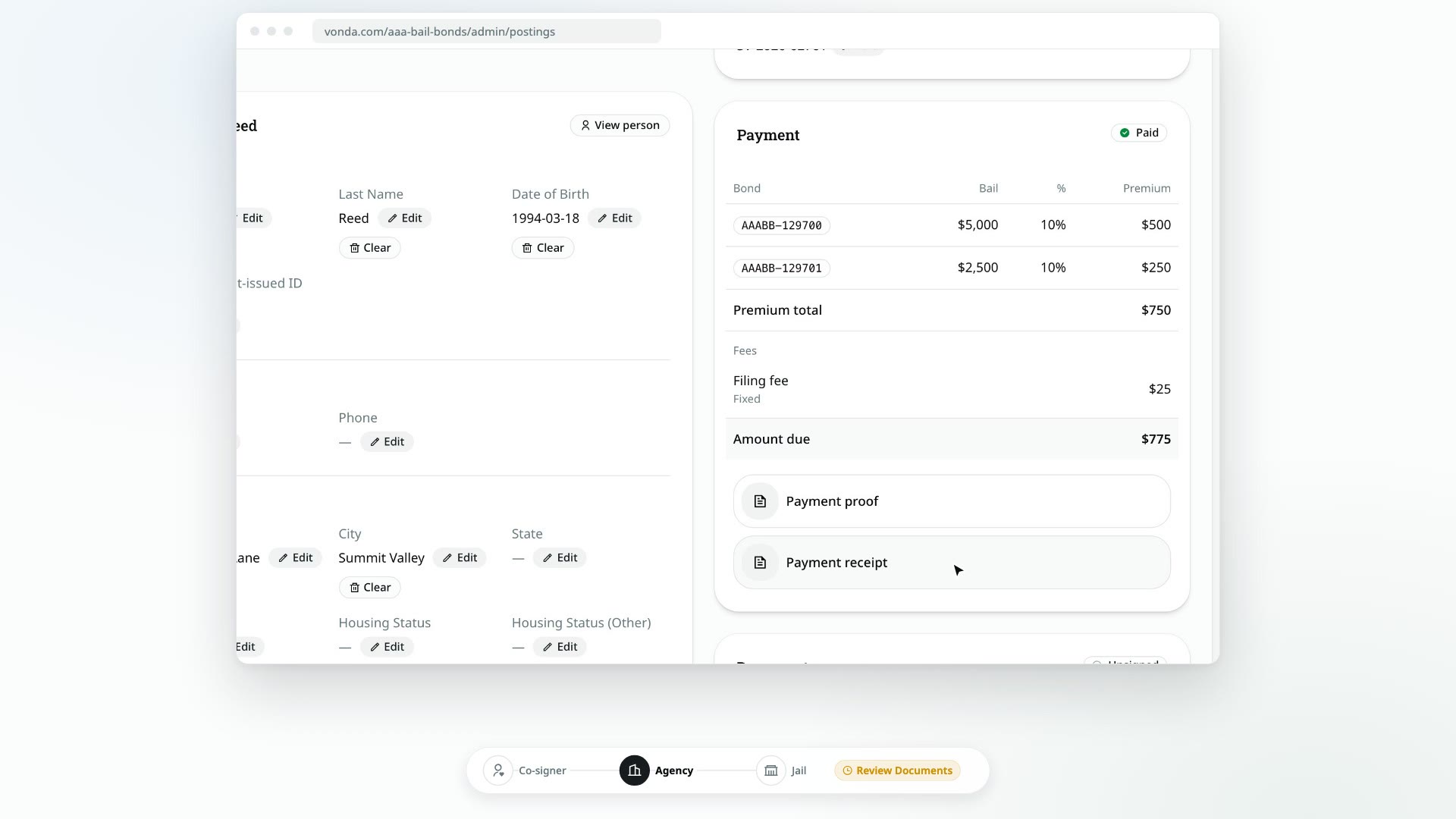
Every paid posting keeps its payment files on the Payment card, under the invoice. They're kept apart from the posting's other paperwork, so you won't find them in the Documents card.
Before you start
- Anyone in your agency can open these files. You don't need to be the posting's agent.
- The posting has been paid, or a co-signer has uploaded proof that's waiting for review. Before that, there's nothing under the invoice.
What you'll find
Depending on how the posting was paid, the Payment card lists up to three files:
- Payment proof: the file the co-signer uploaded, or the receipt you attached when you recorded the payment yourself.
- Online payment proof: a record of a card payment made online with Pay Now.
- Payment receipt: the receipt Vonda creates when a payment is confirmed, recorded or paid online. It shows what was paid, for which bonds, and the fees.
These are the files of the posting's own payment: the amount due in full, or a payment plan's down payment. A payment plan's installments and payoff keep their own files under the plan: see Payment plan receipts below.
Payment plan receipts
A payment on a payment plan gets a receipt too. Besides the bonds and fees, it says what the payment was for (Down payment, Installment 3 of 12 or Payoff of the remaining balance) and has a Payment Plan section with the plan's terms, the next payment and when it's due, and the principal still owed after this payment. Once the plan is paid off, it says so.
Every installment and payoff payment keeps its own files. On the posting's Payment card, they're listed under Receipts and proofs, at the bottom of the plan, newest first, and named by what the payment was for:
- Installment 3 of 12 proof or Payoff proof: the file the co-signer uploaded, or the one you attached when you recorded the payment.
- Installment 3 of 12 online payment proof: a record of an installment paid online by card.
- Installment 3 of 12 receipt or Payoff receipt: the receipt Vonda created for it.
Anyone in your agency can open them, the same way as the files under the invoice.
The primary co-signer gets each receipt too: attached to the message telling them the payment was received, and listed under Receipts on the Payment plan card of their bail page. See Collect installments and payoffs.
Collateral receipts
When a posting's collateral is paid, whether the co-signer paid it online, you confirmed their proof, or you recorded it yourself, Vonda creates a Collateral receipt. It's titled Collateral Receipt, shows the amount you received and how, and says that its return is governed by the indemnification contract. It lists no premiums or fees, because collateral is neither.
You'll find it on the posting's Collateral card, below the amount: click Collateral receipt to open it in the viewer. It isn't on the Payment card, because collateral isn't part of the amount due.
The primary co-signer gets it by email, attached to the message telling them the collateral was received, and on their bail page under Collateral. The receipt stays there after the collateral is returned or forfeited. Other co-signers on the posting don't see it.
Open a file
Go to the Payment card
Open the posting and find the Payment card. The files are listed under the Amount due. An installment's or a payoff's files are under Receipts and proofs, at the bottom of the plan.
Click the file
The file opens in a viewer inside Vonda.
Download it (optional)
Click Download in the viewer to save a copy.
What the co-signer sees
The co-signer gets the same files. The receipt is attached to the email telling them their payment was received or confirmed, and once the posting is paid, their bail page shows the invoice with the receipt and proof under it. Payment files are never part of the documents they sign.